
- By Oleg Vovk
Find out about the structure, integration paths and opportunities for your business.
- 10 Minutes
Microsoft Power BI integrates seamlessly with your SAP landscape through certified connectors, providing direct access to data from SAP S/4HANA, SAP BDC, and SAP Datasphere. This combines reliable SAP data with Power BI’s flexible, modern visualisation and analytics capabilities.

Microsoft Power BI enables business users to analyse SAP data in a familiar, intuitive environment.

Business users can create their own reports and analyses without involving IT for every new requirement.

Controlling teams can analyse and share SAP data, combine KPIs, and create reports together.

SAP remains the central data source, while Power BI provides a flexible reporting front end.

Power BI makes complex SAP data easy to understand through interactive dashboards and clear visuals.

A direct connection to SAP provides up-to-date, centralised data for reporting.
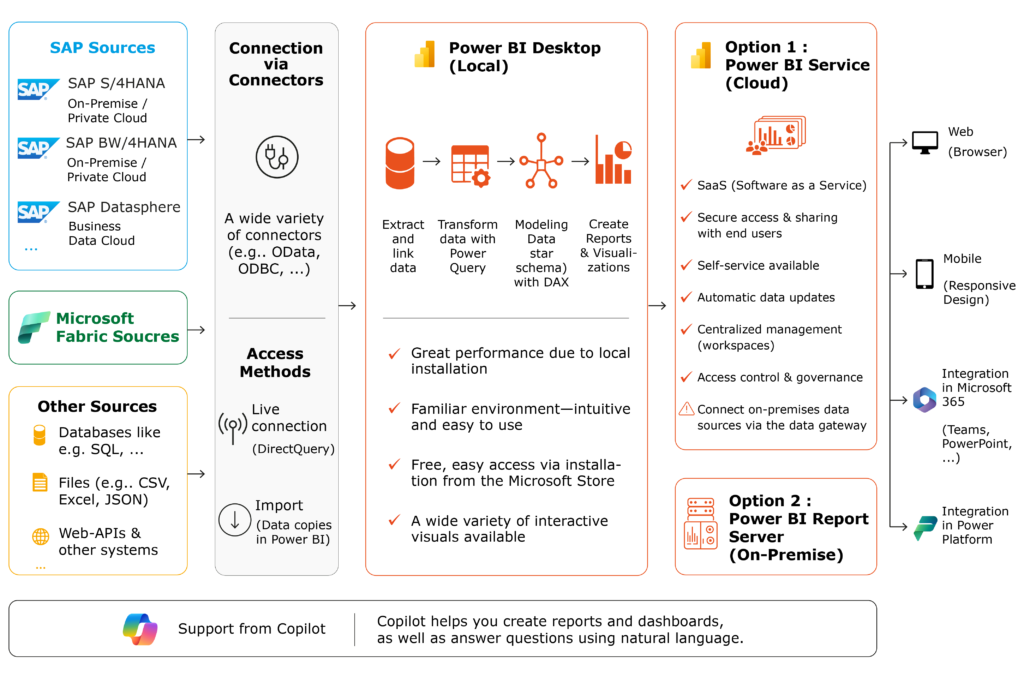
Microsoft Power BI can connect to SAP S/4HANA either directly through various interfaces or via a data platform. SAP S/4HANA remains the reliable single source of truth, while Power BI uses its data for interactive reports and dashboards. Depending on your requirements, integration options include OData services, APIs, or SAP Datasphere. We handle the technical integration and ensure your SAP data is available reliably and consistently for reporting in Power BI.
PIKON provides end-to-end support for integrating Microsoft Power BI into your SAP landscape: from selecting the right architecture and data source to technical implementation. We connect Power BI to SAP S/4HANA, SAP BW/4HANA, SAP Datasphere, or SAP Business Data Cloud and ensure reliable access to your SAP data.
We also support you in building data models, reports, and dashboards and help your business teams get the most out of Power BI. By combining our SAP expertise with in-depth Power BI knowledge, we provide independent guidance in selecting the solution that best meets your needs.
Your trusted partner for data analytics and meaningful reporting.
Microsoft Power BI can be integrated with SAP S/4HANA in several ways: directly through OData services and APIs, via SAP BW/4HANA, or through SAP Datasphere. SAP Business Data Cloud can also serve as a central data platform for making SAP data available in Power BI. Depending on your system landscape, data can either be accessed directly from SAP S/4HANA or prepared through one of these platforms before being visualised in Power BI.
Microsoft Power BI can connect to SAP Business Data Cloud through suitable interfaces that make its SAP data available to Power BI. For example, data from SAP Datasphere, as part of SAP Business Data Cloud, can be prepared and used in Power BI reports and dashboards. SAP Business Data Cloud acts as the central data platform, while Power BI provides a familiar front end for business users. We support you in selecting the right architecture, setting up the connection, and implementing your Power BI reporting solution.
Microsoft Power BI can connect directly to SAP Datasphere using ODBC/JDBC, among other options. Data models and views provided in SAP Datasphere can then be used in Power BI reports and dashboards. SAP Datasphere handles central data integration and preparation, while Power BI serves as the analytics front end. This allows you to manage SAP data centrally while providing business users with the familiar Power BI interface.
Microsoft Power BI can connect directly to SAP BW or SAP BW/4HANA using the SAP BW connector. For example, BW queries can be imported into Power BI and used to create interactive reports and dashboards. Alternatively, BW data can be provided through an intermediate data platform such as SAP Datasphere and then made available to Power BI. The best approach depends on your existing BW architecture, reporting requirements, and preferred data flow.
The right tool depends on your system landscape and specific requirements. Microsoft Power BI is popular with many organisations because its familiar Microsoft interface fits easily into existing workflows. SAP Analytics Cloud, on the other hand, offers advantages through its close integration with SAP and its combined planning and analytics capabilities.
We provide independent advice to help you choose the right tool for your SAP landscape, business users, and reporting requirements. If required, we can also support you with the technical implementation.
If you have any questions about our services or related topics, feel free to contact us!


You are currently viewing a placeholder content from Active Campaign. To access the actual content, click the button below. Please note that doing so will share data with third-party providers.
More InformationYou are currently viewing a placeholder content from Vimeo. To access the actual content, click the button below. Please note that doing so will share data with third-party providers.
More InformationYou are currently viewing a placeholder content from YouTube. To access the actual content, click the button below. Please note that doing so will share data with third-party providers.
More InformationYou need to load content from reCAPTCHA to submit the form. Please note that doing so will share data with third-party providers.
More Information