

Content
Introduction
Anyone who has ever managed an SAP implementation or transformation project knows that the technical implementation of the software is usually not the biggest challenge. It is much more demanding to keep track of requirements, tasks, tests, deadlines, and responsibilities.
While developers are working on the implementation, business departments are discussing processes, testers are documenting errors, and management expects reliable information about the current project progress at any time.
The larger a project becomes, the more difficult it is to bring all this information together consistently. Different versions of documents, unclear responsibilities, or a lack of transparency regarding the actual implementation status are, in my experience, among the most common causes of unnecessary friction in day-to-day project work. This is often where the efficiency of project management is ultimately determined.
One of the biggest challenges is often the lack of integration between different software systems: tasks are distributed via Excel spreadsheets, decisions are maintained in Confluence, and meeting minutes are sent by email without any reference to previous meeting notes. As a result, information is scattered across different systems, making it difficult to establish connections between them afterwards.
To put an end to this chaos, SAP has set out with Cloud ALM to create the all-in-one project management tool for SAP projects.
In this article, we share our experience with SAP Cloud ALM:
- Which features actually make day-to-day project work easier?
- Where does the tool provide real added value compared to traditional tools
- In which areas is there still room for improvement?
What is SAP Cloud ALM
SAP Cloud ALM is a cloud-based SAP tool designed to support the implementation, monitoring, and management of SAP systems. ALM stands for “Application Lifecycle Management” and refers to the management of various tasks related to a software system throughout all phases of its lifecycle.
SAP Cloud ALM is therefore primarily not intended as a project management tool, but rather as a central management platform for SAP systems that supports customers with various activities related to the operation of an SAP system.
As is well known, the “lifecycle” of an SAP system begins with the acquisition of the product itself and ends with its decommissioning. In between, a wide range of activities take place related to maintaining and further developing the system, as well as monitoring the overall system in productive operation.
However, a handful of selected functionalities provided by Cloud ALM make the tool the perfect companion for project management in SAP implementation and transformation projects.
How much does SAP Cloud ALM cost?
Access to the SAP Cloud ALM cloud service is free of charge for most SAP customers if their product license includes SAP Enterprise Support. In principle, this applies to all SAP cloud product licenses (such as SAP S/4HANA, SAP SuccessFactors, or SAP Customer Experience), as well as to on-premise licenses that include the aforementioned Enterprise Support or Product Support for Large Enterprises (PSLE).
However, the use of storage space for system monitoring is excluded from this. Once activated, Cloud ALM copies all entries from relevant log files to its own application database. Depending on the size of the system, this can quickly exceed the storage capacity provided free of charge with Cloud ALM and may result in significant operating costs, particularly because, according to SAP, storage space that has already been consumed cannot simply be released again.
The components of SAP Cloud ALM
SAP Cloud ALM can essentially be divided into three components, each addressing different phases and tasks in the lifecycle of an SAP landscape:
- Implementation
- Operations
- and Service.
SAP Cloud ALM for Implementation supports the implementation and transformation of SAP solutions and provides functions for planning, executing, and tracking such projects. This includes working with SAP Activate roadmaps (e.g., processing Best Practices), managing requirements and tasks within the project, as well as planning and executing test activities.
SAP Cloud ALM for Operations comes into play after the successful implementation of SAP solutions and provides functions to support the operation of an SAP landscape. The focus here is on monitoring the performance and stability of individual applications, their business processes and integrations, as well as the early detection of disruptions.
These two areas are complemented by SAP Cloud ALM for Service, which supports collaboration with SAP as part of service activities and enables, for example, the preparation, execution, and tracking of corresponding service activities.
For managing an SAP implementation or transformation project, SAP Cloud ALM for Implementation is particularly relevant. The remainder of this article therefore focuses on this area.
SAP Cloud ALM vs. SAP Solution Manager
In the context of Cloud ALM, the upcoming end of maintenance for SAP Solution Manager (SolMan) in 2027 is often mentioned first, and Cloud ALM will indeed take over as its successor and become the central ALM tool. However, viewing Cloud ALM merely as a replacement for Solution Manager falls short of the mark, as the tool follows a fundamentally different approach.
With SolMan, the focus was still on the tool’s customizability to ensure maximum control over highly customized on-premise landscapes. Achieving this often required significant customization effort, which resulted in additional costs and extended project timelines. As a cloud service offered free of charge, Cloud ALM eliminates these costs from the outset. Furthermore, SAP’s paradigm shift toward adapting a company’s business processes to standard processes (Fit-to-Standard) has led to a fundamentally different focus in Cloud ALM: standardized speed in projects rather than maximum control over the application.
Cloud ALM consistently follows the SAP Activate methodology and directly incorporates its roadmaps, project phases, and project deliverables into the tool. This creates a close integration between the recommended project approach and operational project management, without the need to transfer information between different tools.
The true value of the tool therefore lies less in its individual functions and
more in the centralized management of all project-relevant information within a single platform.
SAP projects are not ordinary software projects - but they are not entirely different either
It is often claimed that SAP projects are fundamentally different from traditional IT projects. I only partly agree with this statement.
The same fundamental principles for successful project management apply to SAP projects as to any other software project: requirements need to be understood, solutions developed, tested, and ultimately deployed to production. Time, budget, and quality also form the familiar triple constraint of project management here. The key difference in SAP projects lies less in project management itself and more in the way SAP implements its software. SAP provides its customers not only with the software, but also with an established methodology for its implementation. With SAP Activate, SAP offers a framework for project execution that combines extensive experience from previous implementation and transformation projects and derives concrete recommendations for the project approach. This methodology is complemented by standardized roadmaps, best practices, tools, self-service options, as well as process models and predefined test cases.
This makes SAP projects significantly different from traditional custom software development: The focus is not on developing as much as possible from scratch, but rather on first assessing how well existing business processes can align with the SAP standard. Every custom development that can be avoided reduces long-term maintenance effort and significantly simplifies future upgrades.
For the project manager, however, this also means that, in addition to traditional project management tasks, a wide range of other activities need to be coordinated, from requirements identified during Fit-to-Standard workshops and their approvals to managing process documentation, testing, and change management activities. The latter in particular account for a significant portion of the effort in transformation projects when the aim is to closely support employees’ readiness for change as part of the Fit-to-Standard approach. This is precisely where many projects face their greatest organizational challenges.

Whitepaper
The Practical Guide to Your Public Cloud Journey
The whitepaper explores the opportunities and challenges of SAP S/4HANA Cloud Public Edition. It also covers strategic considerations when selecting the target architecture and provides a structured approach to implementation based on the SAP Activate phases.
How does SAP Cloud ALM Support Day-to-Day Project Management?
Once the organizational framework has been established and the project has started, the project team can begin its actual work. From a project manager’s perspective, the same question arises every day: Where do we currently stand in the project, and what requires our attention today?
The answer cannot be found in a task list alone. Instead, requirements, business processes, development tasks, tests, and project progress need to be brought together in a common context at all times.
This is precisely where Cloud ALM differs from many traditional project management tools. While other solutions often merely manage tasks, Cloud ALM follows the entire lifecycle of a business requirement, from the initial process discussion through to the successful deployment of the solution. This provides a comprehensive overview of the project at all times, enabling well-informed decisions to be made.
Documenting Requirements clearly before Development begins
Many difficulties during the implementation phase of a project can, as is well known, be traced back to significant shortcomings during the planning phase. Incompletely described requirements inevitably lead to follow-up questions, misunderstandings, additional coordination efforts, and, in the worst case, incorrect implementation. The later these problems are identified, the more expensive they are to resolve.
For this reason, proper requirements management is particularly important. Cloud ALM makes it possible to assign requirements directly to the relevant business processes and to continuously develop and refine them throughout the project. Changes remain documented and can be tracked through to their subsequent implementation.
At any point, it is possible to see
- why a requirement was created,
- which business process it is assigned to,
- which implementation tasks (“user stories”) result from it,
- whether these have already been developed,
- and whether the implementation has been successfully tested.
This level of transparency significantly reduces the effort required to manually trace the relationships between requirements, development, and testing, particularly in larger transformation projects.
Business Processes at the Heart of an SAP Project
With the Activate framework, SAP consistently follows the approach of aligning implementation projects with a company’s business processes. The challenge is therefore usually not installing software, but rather working with the customer to determine which business processes can be mapped using an SAP standard process and where extensions to the standard are required.
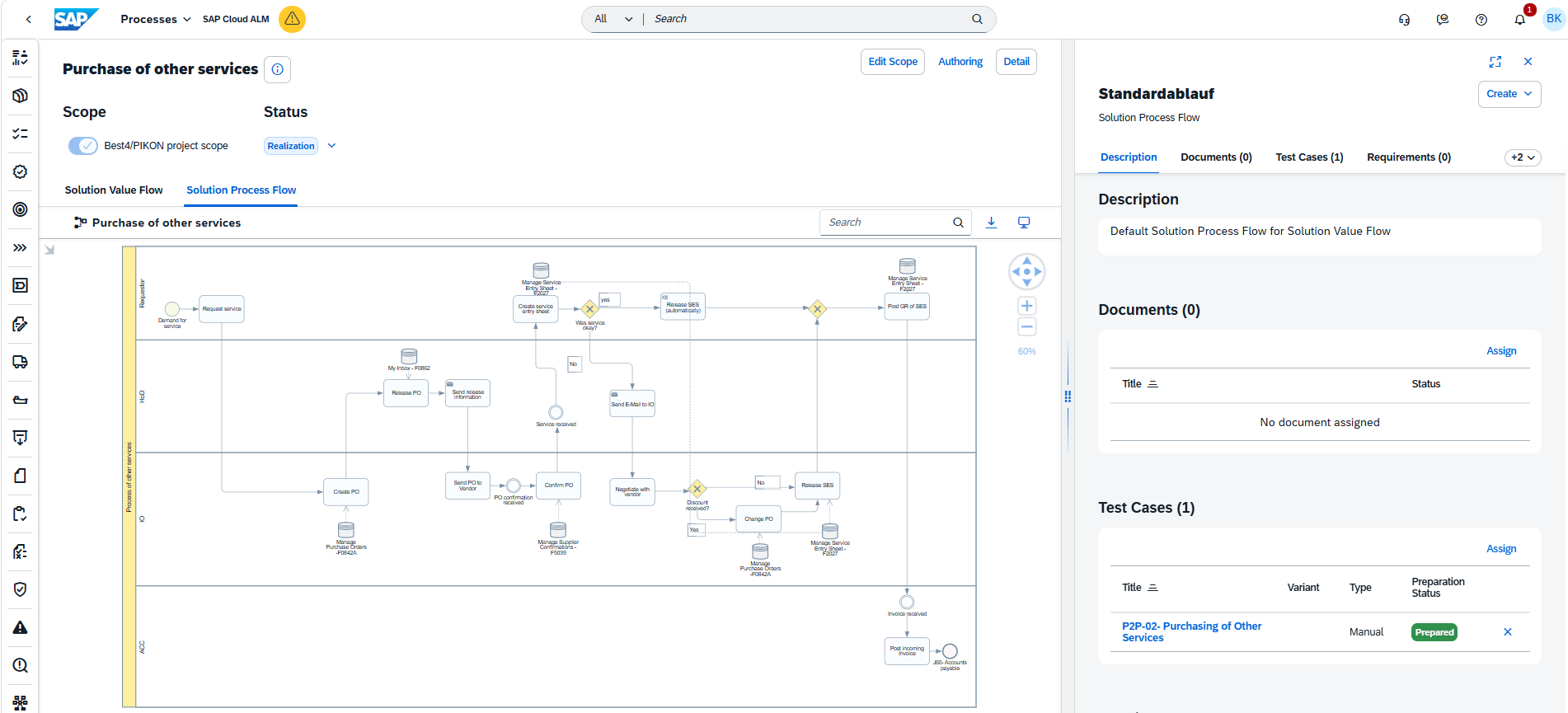
Cloud ALM supports this approach through integrated process modeling based on BPMN. Business processes can be documented directly within the tool and linked to requirements and other project documentation.
The advantage here lies less in the modeling itself and more in the fact that all project stakeholders have access to the same information base. This significantly reduces discussions about different document versions or scattered process descriptions.
Especially in longer projects, a large number of documents, presentations, and workshop results can accumulate very quickly. If this information is consistently maintained in a central location, Cloud ALM develops into a reliable knowledge base over the course of the project and thus becomes a true “single source of truth.”
Of course, the integrated document management functionality does not replace a specialized Enterprise Content Management system. For most project artifacts, however, the functionality is more than sufficient and eliminates the need to maintain additional storage structures.

SAP Cloud ALM Decision Workshop
The workshop provides a balanced overview of SAP Cloud ALM, including its maturity level, limitations, scenarios for which it is unsuitable, and a realistic comparison with SAP Solution Manager. Together, we will work through your use cases, and you will receive a recommendation on whether or not to use the tool.
Development Tasks: Task Management Instead of Task Administration
Any project management tool can manage tasks. The real difference, however, lies in how these tasks are connected to one another.
Cloud ALM distinguishes between different types of work items, such as requirements, project tasks, user stories, and technical implementation tasks. These can be assigned to responsible individuals, prioritized, scheduled, and evaluated in the context of the project.
Thanks to SAP Activate, many tasks do not have to be created from scratch during the project but can be adopted directly from the selected roadmap. This makes getting a project started significantly easier in particular.
In addition, results from other SAP tools can also be transferred. For example, actions from an SAP Readiness Check can be imported into Cloud ALM with virtually no manual effort and then worked on directly. Particularly at the beginning of an S/4HANA transformation, this provides a solid foundation for further project planning very quickly.
Integration with Jira and Other Tools
Of course, many larger companies already have established tools such as Jira or Azure DevOps. In such projects, the question often arises as to whether Cloud ALM should completely replace these tools. In many cases, this is not necessary: SAP offers various integration options for the tool, allowing existing development tools to continue being used without sacrificing the end-to-end traceability of project artifacts in Cloud ALM. The appropriate strategy depends on the organizational circumstances of the individual company.
Test Management: The Real Stress Test of an SAP Project
The test phase is where it becomes clear how well a project has actually been prepared. Incomplete requirements, missing process documentation, or unclear responsibilities can hardly be hidden any longer at this stage. It is therefore all the more important that requirements, test cases, and defects are not managed in isolation but are connected within a common context. With Cloud ALM, test cases can be derived directly from documented business processes or the underlying requirements. Existing standard test cases from SAP Best Practices can be adopted and extended to meet project-specific requirements.
During test execution, Cloud ALM supports the organization of test packages, their assignment to individual testers or test teams, and the evaluation of test progress. Open test cases, successful test runs, or tests that are still pending can be tracked at any time using the integrated reporting functionality.
For detailed information on test management functionalities in SAP Cloud ALM, see the blog article Test Management with SAP Cloud ALM.
Making Project Progress Visible
As project size increases, so does the effort required for reporting. Project status, open risks, schedule deviations, or outstanding tasks need to be regularly prepared, presented, and distributed to management, the steering committee, and business departments. In many projects, this still means consolidating information from various sources and presenting it in a suitable format.
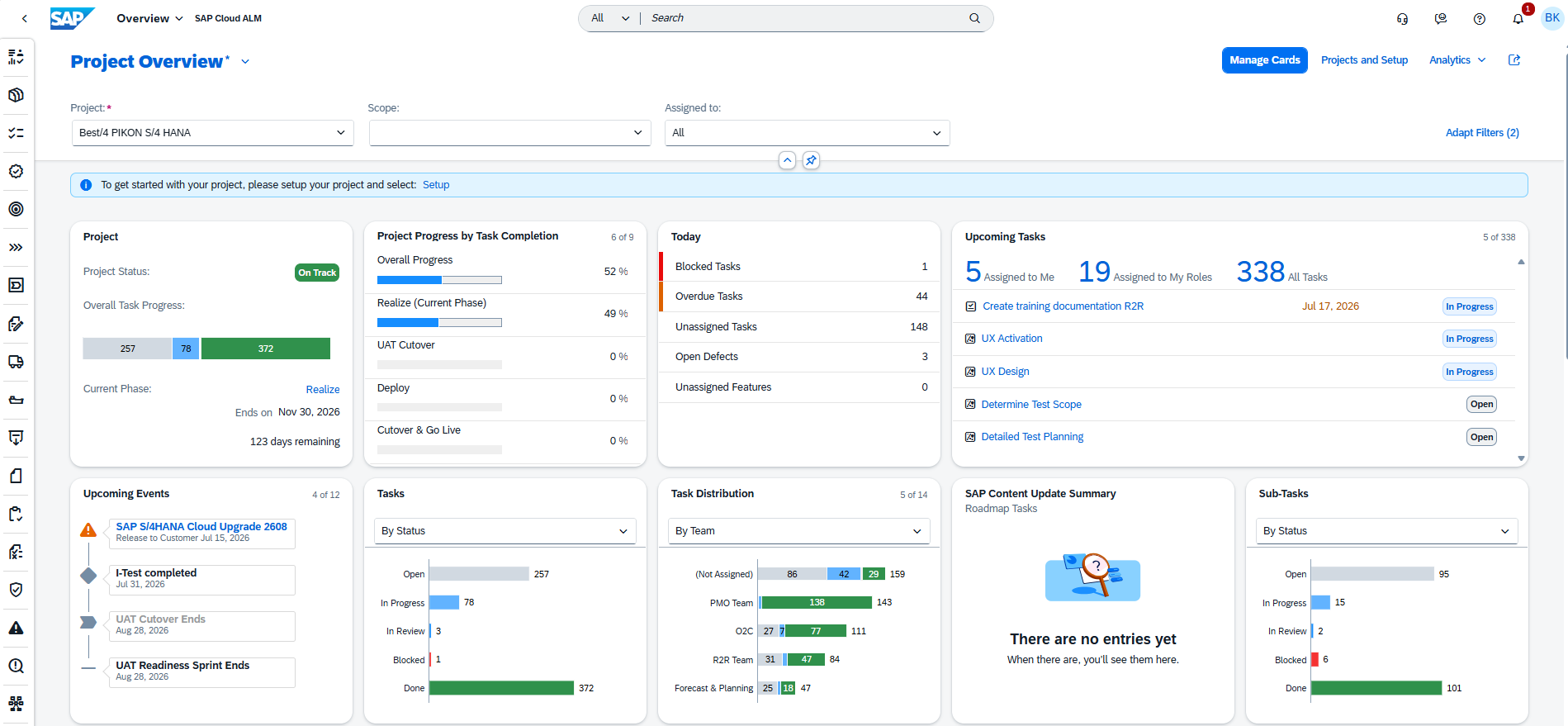
Since requirements, tasks, tests, and defects are managed within the same platform in Cloud ALM, numerous reports and analyses are available without additional maintenance effort. This makes it possible to evaluate project progress, sprint status, or outstanding work packages without any additional setup, providing up-to-date figures directly for regular status reports.
Of course, this does not replace the project manager’s assessment. A dashboard cannot determine which risks are actually critical or which priorities need to be set within the project. However, it eliminates a significant amount of manual data collection and therefore creates more time for the actual management and steering of the project.
Final Assessment
Where I currently see room for improvement
As convincing as Cloud ALM already is in many areas, there are still some features that I would like to see in my day-to-day project work. At the top of my list is resource and capacity planning. While Cloud ALM provides excellent support for requirements, tasks, and tests, the actual resource planning for project team members in my projects is currently still handled outside the tool. Especially for larger transformation projects, I believe this would be a valuable addition.
Another area concerns formal change management. The tool already provides options for managing approvals for requirements. However, for comprehensive scope management, I currently miss a binding workflow that would allow approved changes to be systematically incorporated into the project scope. Especially in larger projects, this would be an effective way to prevent scope creep.
I also see further potential in the area of scheduling. The existing Gantt view already provides a clear overview of milestones and delivery dates. However, features such as the automatic recalculation of dependent dates, visualization of the critical path, and the ability to reorder visualized tasks via drag and drop would, in my view, significantly simplify operational project management and take working with the Gantt view to the next level.
My Conclusion
The success of an SAP implementation is not determined solely by the quality of the tools being used. SAP projects only succeed through proper organization, clear responsibilities, and constructive collaboration among all those involved.
This is precisely where SAP Cloud ALM provides support.
From my perspective, the platform’s greatest strength lies not in individual features, but in consistently bringing together all project-relevant information. Business processes, requirements, tasks, tests, and defects remain interconnected, providing exactly the overview that a project manager needs to make well-informed decisions.
Cloud ALM can neither replace experience nor professional project management. A poorly organized project will not necessarily become successful simply by introducing a new tool. However, when a project team is willing to consistently use the platform as its central working tool, that is when it delivers its greatest value.
Especially for companies preparing for an S/4HANA implementation or a major SAP transformation, Cloud ALM already offers a range of functionalities that goes far beyond simple task management. Its close integration with SAP Activate, end-to-end traceability of business requirements, and subsequent support for operations make the platform, in my view, a valuable companion throughout the entire lifecycle of an SAP system.
With the announced end of maintenance for SAP Solution Manager, virtually every SAP company will have to address Cloud ALM sooner or later. From my perspective, there is much to be said for not waiting until time pressure sets in, but instead deliberately combining its introduction with an upcoming transformation project. This allows the project team to gain experience with the platform at an early stage while simultaneously benefiting from its capabilities.
Contact us!
Cloud ALM Supports Us – Can We Support You?
Whether SAP Cloud ALM can deliver the desired value for your project depends largely on the project size, organizational structure, and existing tool landscape. We would be happy to help you answer this question together and make effective use of Cloud ALM in your project.
We look forward to speaking with you.

You are currently viewing a placeholder content from Active Campaign. To access the actual content, click the button below. Please note that doing so will share data with third-party providers.
More Information